How to Book a Virgin Atlantic Reward Flight
Booking a Virgin reward flight is not technically difficult. The process is straightforward once you reach the confirmation screen. What makes it feel hard is the way most people approach the search — one date, one route, one cabin, and a fixed expectation of what pricing “should” be.
Dynamic pricing means the same seat can cost 29,000 or 250,000 points depending on when you look. The skill is in the search and decision process, not the booking mechanics. This guide covers both.
The difficulty is not the booking process. It is knowing how to search, interpret results, and decide when to act. Searching broadly, reading Saver labels, and comparing across dates and cabins turns reward bookings from a frustrating lottery into a repeatable process.
Step 1: Start with the Reward Seat Checker
Do not start by searching for a specific flight. Start with Virgin’s Reward Seat Checker — a month-view calendar that shows the lowest available price for every day across all three cabins (Economy, Premium, Upper Class).
Access it at virginatlantic.com/reward-flight-finder or from your Flying Club account page. You do not need to log in to use the Checker, but you will need a Flying Club account to book.
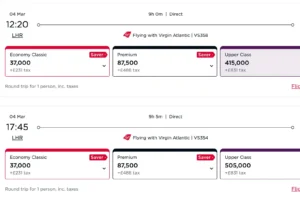
Enter your departure airport, destination, and travel month. The calendar displays the lowest price per day per cabin. Dates with a red Saver tag are at the lowest pricing tier — these are the ones to target. Use the arrows to scroll through months. Click the reverse arrows to check return dates.
The Reward Seat Checker shows Virgin-operated flights only — partner airlines (Delta, Air France, KLM etc.) are not included. For partner availability, you must search separately on the main booking page.
Bookmark your Reward Seat Checker searches. The URL contains the route and month — you can return in seconds to check whether pricing has changed or new Saver seats have appeared. You can scan an entire year of availability on one route in about a minute.
Step 2: Interpret What You See
The first price you see is rarely the only option. Before committing, ask: is this Saver pricing (red label) or standard? Is pricing consistent across nearby dates, or is one day significantly cheaper? Does Premium look steadier than Upper Class? Is midweek cheaper than weekends?
Treat the first search as data collection. Note the patterns. If Upper is 29,000 on a Tuesday but 180,000 on a Saturday, that tells you where the demand cycles sit. If Premium shows Saver on multiple dates but Upper does not, the upgrade route may be more reliable than booking Upper outright.
Step 3: Check the Upgrade Path
Full Upper Class redemptions are not the only way into the cabin. If Premium shows Saver pricing and Upper does not, consider booking Premium and upgrading later. Upgrading one cabin often requires fewer points than booking the higher cabin directly — especially when dynamic pricing pushes Upper into standard territory.
The upgrade must be processed by phone (you cannot book and upgrade in one online transaction), but it adds flexibility. You secure a confirmed Premium booking now, then monitor for Upper upgrade availability.
Step 4: The Actual Booking Process
The Reward Seat Checker does not let you book directly. Once you have identified your dates, you need to go to the main booking page separately.
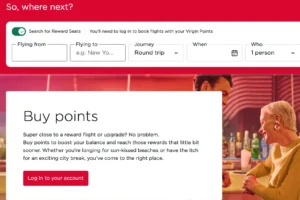
1. Log into your Flying Club account on virginatlantic.com. You must be logged in to search for reward flights — this is different from most airlines.
2. Click “Book reward flight” (or use Advanced Search and select “Price in Points”). Enter your route and the specific dates you found in the Checker.
3. Select your outbound flight and cabin. The search will show available flights with points pricing plus taxes/fees for each.
4. Select your return flight (if booking a return). Review the total — points required plus cash for taxes, fees, and carrier charges.
5. Confirm and pay. The booking tickets immediately.
Virgin Atlantic opens reward seats 331 days in advance. For popular routes and premium cabins, the best Saver pricing often appears at release and again in the final 2–4 weeks before departure.
Step 5: Compare Partner Options
If Virgin pricing looks elevated on your dates, SkyTeam partner airlines provide a reference point. Partners use fixed distance-based award charts — predictable pricing that does not move with demand.
Search for partner flights on the main Virgin Atlantic booking page (not the Reward Seat Checker). Some partners are bookable online; others require a phone call. The partner search shows Delta, Air France, KLM, and other SkyTeam airlines.
Checking partners adds perspective. If a SkyTeam flight costs 50,000 points fixed and Virgin is showing 180,000 dynamic, the partner is the clear winner. If Virgin is at Saver and cheaper than the fixed chart, Virgin wins.
After Booking
Changes
You can change dates, flights, or routing for £70 per person (UK departures) or $100 (non-UK). If the new flight costs fewer points, the difference is refunded. If it costs more, you pay the difference plus the change fee. Contact Flying Club via webchat in My Booking or by phone.
Cancellations
Same fee structure: £70 per person (UK) or $100 (non-UK). Points and taxes are refunded minus the cancellation fee. Vouchers used on the booking are returned.
Cancel within 24 hours of departure and the rules change significantly — points are forfeited and only some government taxes are refunded. If plans are uncertain, cancel well in advance.
Flying Club Gold members have the cancellation fee waived entirely, making reward bookings considerably lower risk at that status level. Always verify this with Virgin Atlantic directly, as member benefits can change.
Tier Points on reward flights
Unlike many programmes, Virgin awards Tier Points on reward flights — typically at 50% of the rate for paid tickets. This means points bookings contribute towards Silver and Gold status. It is one of Flying Club’s genuinely unusual advantages.
Monitor after booking
Upgrade space can open after booking. Pricing can shift. If you booked Premium hoping to upgrade to Upper, keep checking. If Upper Saver appears, call to upgrade immediately.
Tools Beyond Virgin’s Own
Virgin’s Reward Seat Checker is the best starting point but only covers Virgin-operated flights. Third-party tools can help with broader searches:
SeatSpy — shows award availability across multiple months on a single page, with filtering by points threshold and number of seats. Some users find it more efficient than Virgin’s own Checker for scanning large date ranges.
seats.aero — searches award availability across multiple airlines including Virgin Atlantic. Useful for comparing Virgin and partner options simultaneously.
Award Travel Finder — another third-party search tool showing Virgin reward seat availability with route-by-route pricing data.
Common Mistakes
Searching one date only. Dynamic pricing means one day can be 29,000 and the next 150,000. Always scan a range.
Chasing Upper Class only. Premium plus an upgrade is often the stronger, more reliable path into the front cabin.
Booking emotionally. Seeing a seat and panicking leads to rushed decisions at inflated prices. If it is not Saver pricing, consider whether waiting or adjusting dates is smarter.
Ignoring partners. SkyTeam fixed charts provide stability when Virgin pricing fluctuates. Always check the alternative.
Not logging in. Virgin requires you to be logged into Flying Club to search reward flights. If you get errors or see no results, check you are logged in.
Transferring points before searching. Always confirm availability and pricing first. Then transfer from Amex or other flexible currencies. Transfers are instant — there is no reason to transfer speculatively.
Reward Seat Checker first. Note Saver dates and prices. Move to the booking page. Compare against partners if pricing is elevated. Book when the route works, the cabin improves the journey, and the points cost feels rational. Your first booking should be “good enough to learn.” Pattern recognition beats perfection.